 Nailbit
Interrupt nail biting while you work.
When Nailbit detects a possible bite, it can cover your Mac display in black or white static. Turn it up to make your work hard to see until the cue fades.
See today’s episode count and total time in detected episodes, plus time since the last episode.
 Cue off
 Cue fading
How it works
Nailbit is a focused and near real-time behavioral feedback system for nail biting.
-
Start a session
Leave Nailbit open on an iPhone facing you, or start it from your Mac menu bar while you work.
-
Choose how strongly it interrupts
Use a subtle edge cue or full-screen static. The cue appears when Nailbit detects a possible bite and fades when detection ends.
-
See today’s stats
Check today’s episode count and total time in detected episodes, plus time since the last episode. Those stats stay on your device.
iPhone and Apple Watch
Stand your iPhone up facing you with Nailbit open. Detection runs on your device, and the screen cue appears inside Nailbit.
- Simple mode is one full-screen view: the drawing and today's count, with every other control out of the way.
- The camera view draws your face and hands instead of showing the picture. Video is there if you want it.
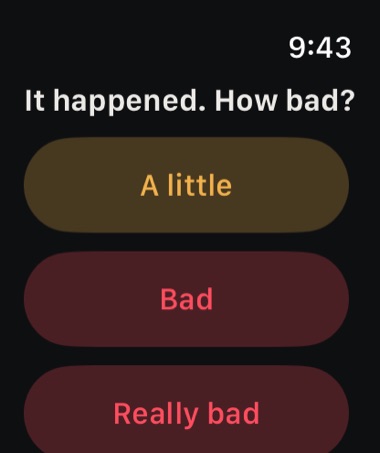
- On Apple Watch, one tap logs that it happened and how bad it was: a little, bad or really bad.
- While Nailbit is watching on your iPhone, the open Watch app can tap your wrist when the iPhone detects a possible bite.
Mac
Start Nailbit from the menu bar and keep your usual apps open. The webcam checks for possible bites on your device. A full-screen cue can cover every display, even when another app is in front.
Privacy
- No account, no ads, no tracking.
- Camera frames stay on your device, unless you turn on the second opinion and allow a specific service.
- Frames are saved only when you mark a mistake, and you can turn that off.
- Anonymous usage counts are shared only if you choose to.
What you need
| iPhone | iOS 17 or later |
|---|---|
| Apple Watch | watchOS 10 or later, with Nailbit on your iPhone |
| Mac | macOS 14 or later, Apple silicon, and a webcam (the built-in one works) |
Questions
What does Nailbit do?
Nailbit checks for possible nail biting while you run a camera session. You choose how strong the visual cue is. On Mac, it can cover every display and obscure your work. On iPhone, the cue appears inside Nailbit.
Does Nailbit send my camera video anywhere?
No. Detection runs on your device, with Apple's face, hand and body tracking. Camera frames stay on your device unless you turn on the optional second opinion, choose a vision model service, add your own API key and allow it. Frames are saved on your device only when you mark a mistake, and you can turn that off.
How much does Nailbit cost?
Nailbit is $0.99 in the U.S. as a one-time purchase. There is no subscription. The App Store shows the price in your region.
Which devices does Nailbit work on?
iPhone with iOS 17 or later; Apple Watch with watchOS 10 or later, with Nailbit on your iPhone; and a Mac with Apple silicon and macOS 14 or later, with a webcam (the built-in one works).
Can I use Nailbit on my Mac while I work?
Yes. Start it from the menu bar and keep using your usual apps. When Nailbit detects a possible bite, the cue can appear across your Mac displays. Your apps stay open underneath it.
How does Nailbit tell biting from resting my chin on my hand?
It looks at your face, hands and arms together over a few seconds to tell the movements apart.
Can I adjust the screen cue?
Yes. In Settings you can change the color, grain, fade and detection sensitivity. Calm static holds the grain still and turns on automatically when Reduce Motion is on.
How do I set up a full-screen Mac cue?
In Settings → Effect, set Edge reach to 0.00 for even coverage and raise Max intensity. Choose Custom and set both Base color and Accent color to black or white. Use Preview effect to check it.
What does Nailbit count?
Nailbit shows today’s episode count and total time in detected episodes, plus time since the last counted episode. Simple mode shows today’s count. These stats are kept on your device.
How do I mark a mistake?
You can flag a false alarm or missed bite in the app or from Apple Watch while your iPhone is watching. On Mac, press Space twice during a cue to flag a false alarm. You can review flagged moments on your device.
Is Nailbit a treatment for nail biting?
No. Nailbit is a habit awareness tool, not a medical device. It does not diagnose or treat anything. It helps you notice nail biting while it is happening.
Where is Nailbit available?
On the App Store for iPhone and Mac, outside the European Union. It is not available in the EU yet.
Get Nailbit
$0.99 in the U.S. One-time purchase. No account or subscription.